








- Tools
 Figma
Figma Claude Code
- Claude Design
- FigJam
1.Context
The Problem
Injured people call law firms at night and hit voicemail. The ones who do sign up miss doctor’s visits, which weakens their case.
What Gideon Does
An AI receptionist that answers every call, keeps each client’s treatment on track, and holds the whole case in one CRM.
Where I Come In
The product was completely vibe-coded when I joined, as the Founding Product Designer. I was responsible for restructuring the app, redesigning its busiest screens and building the design system, and I built those changes in code with Claude Code and merged them into the app myself.
What I Knew, and What I Didn’t
What I Had
I sat in on the calls our CEO had with law firms, and listened back to Gideon’s own recorded calls, so I knew how a case sounds before it reaches a screen.
What Was Missing
No coordinator was using Gideon yet, so I never watched a real one work. Marcus and Daniela came out of those calls, not out of interviews.
The Workaround
I designed from the calls, checked every crowded screen against both personas, and shipped in small pieces so our first firm could correct me.
2.User Personas
The owner who pays for Gideon and the coordinator who uses it every day need different things. When a screen got crowded, I checked it against both.
Marcus Reyes
Law Firm Owner Who Pays for Gideon
“I pay about $1,000 to bring in each new client, and half the people who call us hit voicemail.”
Pain Points
- Missed calls after hours
- Cases get stuck during treatment
- Too many tools
Solutions
- The AI answers every call, day or night
- Cases move on with tasks still open
- Intake, treatment and settlement in one app
Daniela Ortiz
Case Coordinator Who Uses Gideon Daily
“If the AI is calling my clients, I need to see what it says, approve it and take over when it goes wrong.”
Pain Points
- Calling every client manually
- Inability to manage clients at once
- No say over what the AI does
Solutions
- The AI makes the calls
- One list of every task waiting on her
- She approves every call before it runs
Meet Ryan
To show where my work fits, I follow one case through this page. Ryan is rear-ended at a red light on his way home on a Friday night, and calls Marcus’s firm at 11:47 pm, long after the office has closed.
Ryan Brooks
The Client, Calling After a Car Accident
“Someone just rear-ended me and my neck is killing me. Is anyone even there this late?”
3.User Flows
On Saturday morning, Daniela picks up Ryan’s case. The flows show exactly how it moves, with each decision that changes what happens next, so every screen I designed has one job and every hand-off has an owner. Press play to walk Ryan through it.
Signing a client was split between Intake and Onboarding, so I put the whole path, from first call to signed client, in Intake.
- Ryan calls the firm about his accident
- Gideon answers and takes down the case details
- Gideon adds the new lead to Intake
- Daniela reads Gideon’s notes and checks the firm’s criteria
- Meets the criteria?
- If yes: Daniela sends the firm’s agreement to sign
- Ryan signs and becomes the firm’s client
- If not: Daniela drops the case
- Or refers the case to another firm
2Booking a visit
The order I set, where Daniela only steps in when every call fails.
- Ryan needs treatment for his injury
- Daniela opens Treatment (from the sidebar)
- Daniela calls the clinics for open slots
- Ryan picks one of the open slots
- Daniela books the visit and sets its 2 calls
- Daniela approves the confirmation and follow-up calls in Tasks
- Gideon calls Ryan to confirm
- Confirmed?
- If not, Attempts left?
- If not: No attempts left: escalated, and Daniela steps in
- If yes: Ryan goes to the visit
- After the visit, Gideon calls to follow up
- Said he went?
- If yes: Ryan says he went, and the visit is complete
- If not, Attempts left?
- If not: No attempts left: escalated, and Daniela steps in
Every step, from the first clinic call to the last follow-up, is recorded on the client’s profile.
4.The Flow
5.Competitor Study
These firms already run their cases on a system like this one, so I opened a case in it and worked through the day a coordinator has. I was looking for what makes that day slow.
A Case in Their System
- 1Everything sits on screen at once, so nothing stands out as more important than anything else
- 2It records what has happened, but never says what to do next
- 3The person does all the chasing, and the app only keeps a record of it
So I gave Gideon’s screens one job: say what needs doing, who does it next, and what Gideon has already done. If something on the screen did none of that, I cut it.
6.Problem Solving
I started with the 3 interfaces case coordinators use and open most, so the first fixes would help the most. Across all 3, I held to one rule from Daniela’s quote:
The AI does the work, and a person stays in charge.
Every call Gideon makes can be approved before it runs, seen afterwards in View Calls, and taken over when it fails.
Creating Appointments
- Ryan calls
- Ryan signs
- Visit bookedThis problem
- Calls confirmed
- Lawyer checks
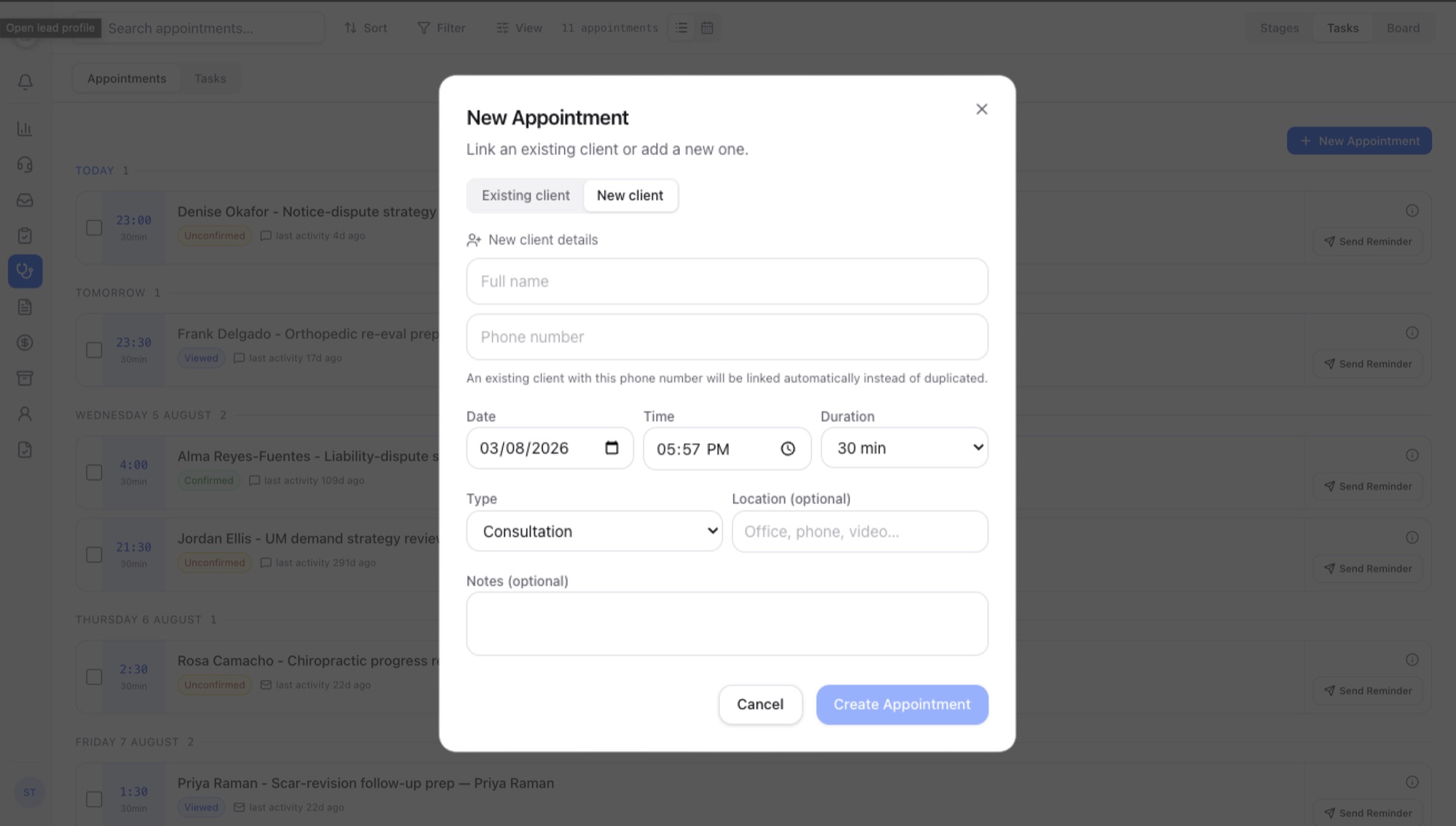
In Ryan’s first week, Daniela needs to book his physio visits and set a confirmation and a follow-up call for each.
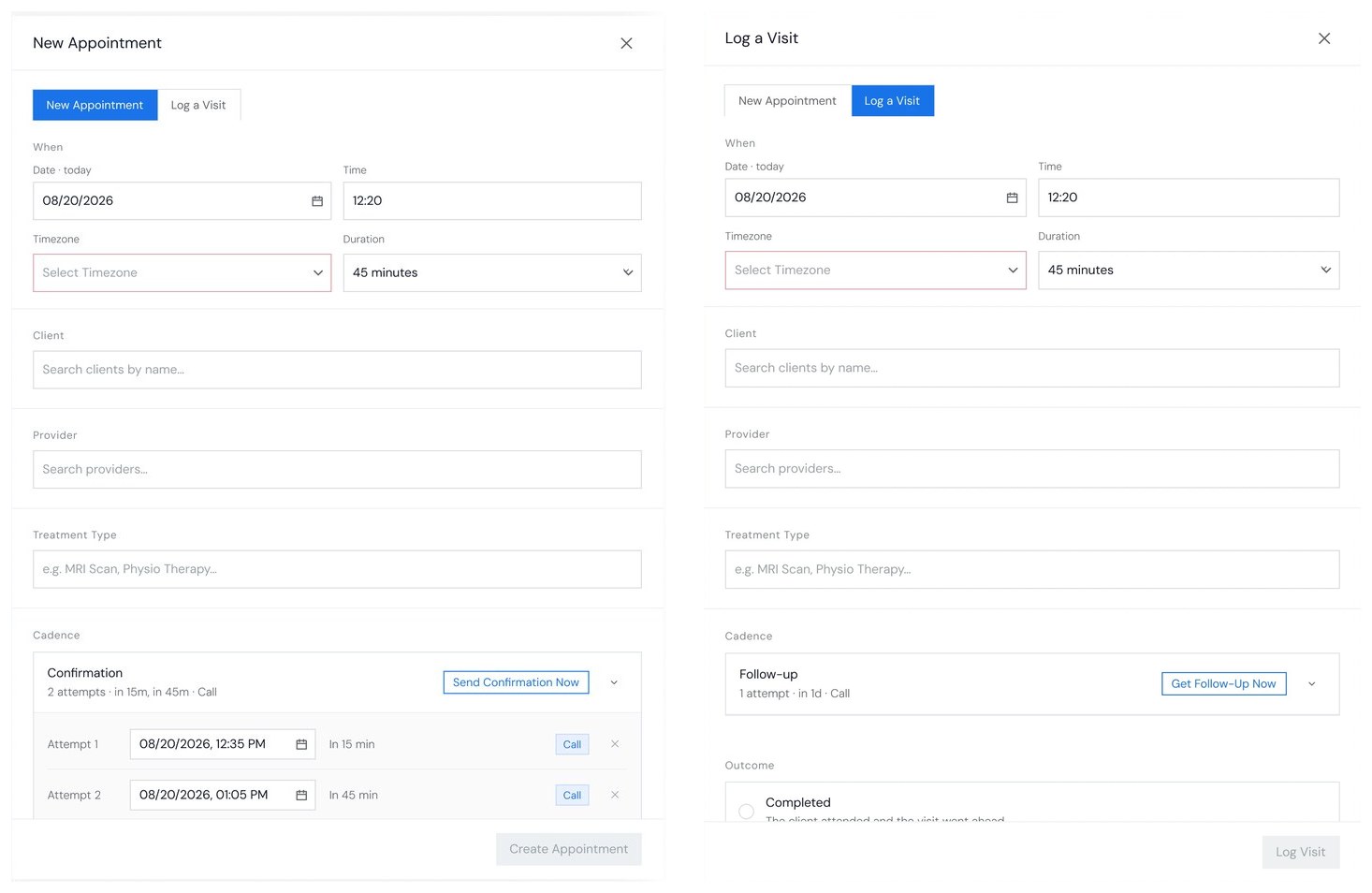
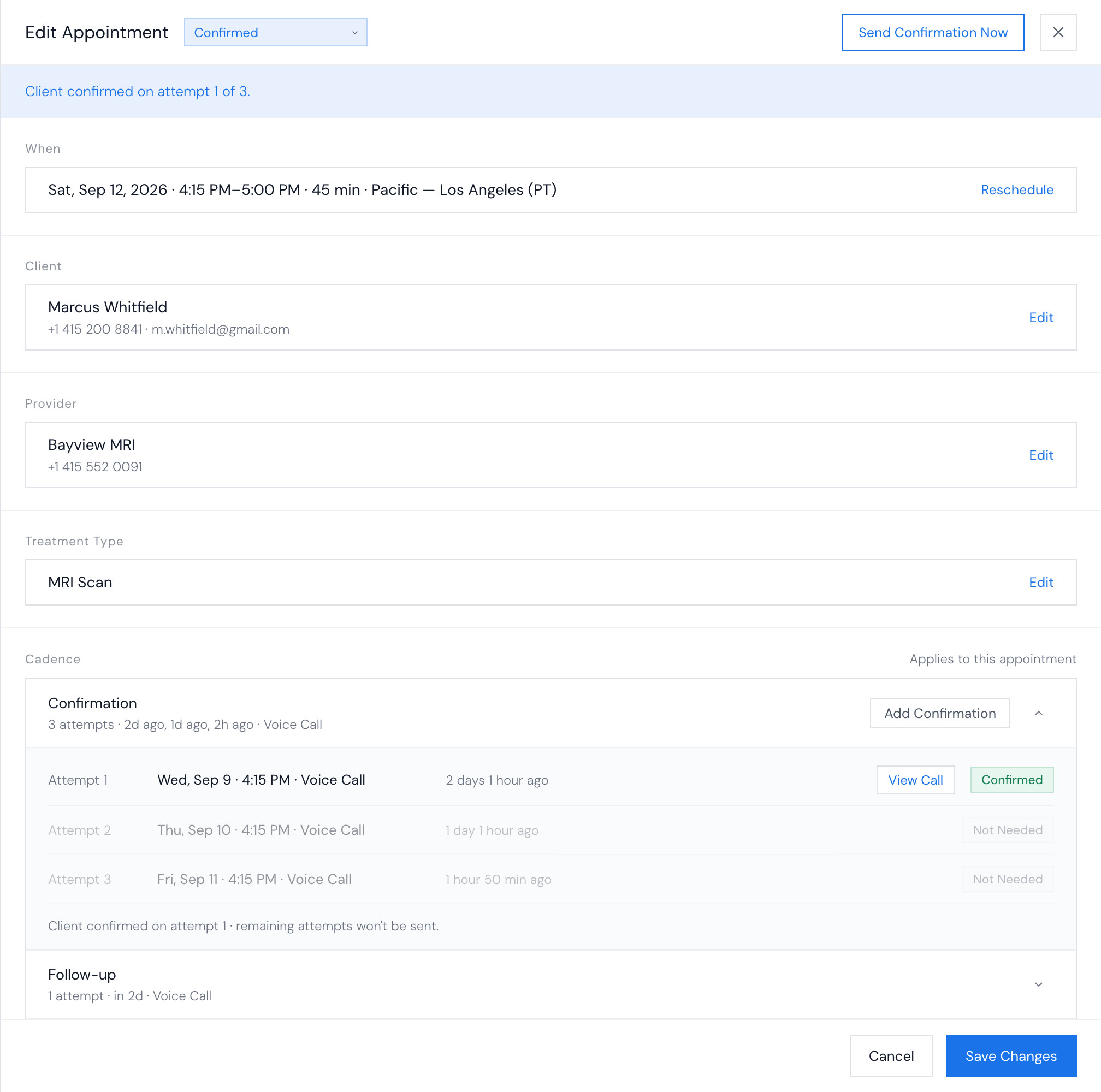
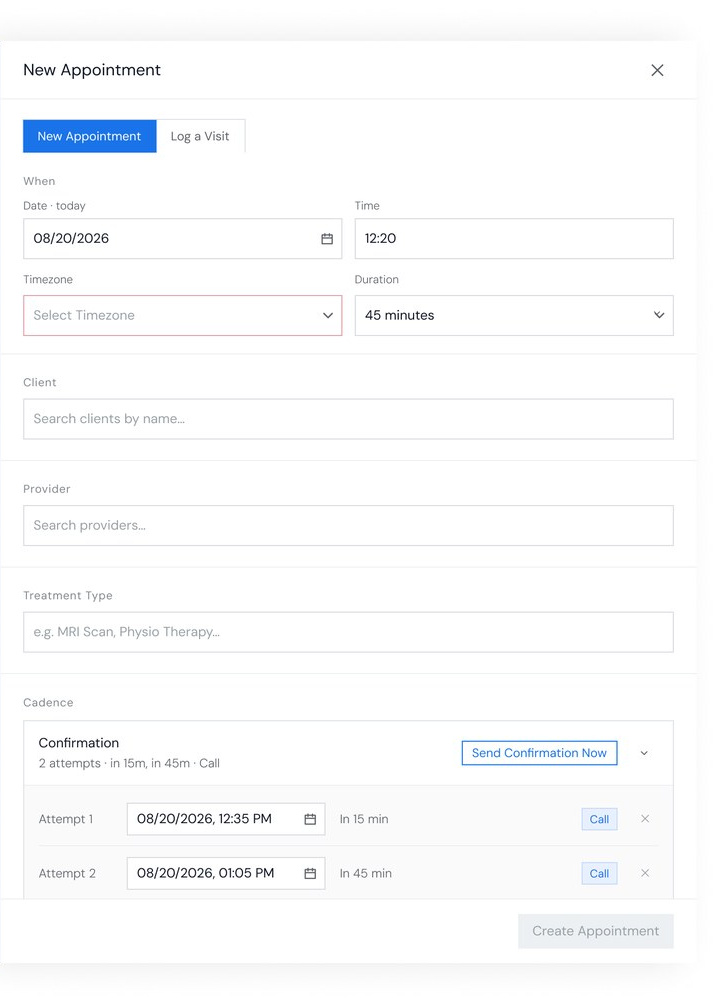
Creating an appointment asked for a handful of details, editing it showed every field at once, and neither form could log a past visit or schedule its calls. I rebuilt both as one modal with a Create and an Edit mode, and rewrote the statuses so a coordinator can tell at a glance whether a visit is still coming, already happened, or needs chasing.
Creating Appointments
 1
2
3
4
1
2
3
4
 1
2
2
2
3
3
4
4
5
5
+
+
+
+
1
2
2
2
3
3
4
4
5
5
+
+
+
+
- 1A handful of fields, and the rest of the appointment only appears once you save and open it again
- 2A toggle just to say whether the client is new
- 3A fixed list of treatment types, with no way to add your own
- 4Nothing about when Gideon calls, and no way to log a visit that already happened
What got simpler
- 1Date, time, timezone and duration in one block
- 2Client, clinic and treatment type in one column, each with a way to add a new one without leaving the modal
What the redesign added
- 3New Appointment and Log a Visit, in one modal
- 4A confirmation cadence, with the exact time of every attempt
- 5Call now: a confirmation before the visit, or a follow-up on a past one whose outcome nobody knows
- Opens a close-up of that field, like adding a new client or a custom treatment type
Editing Appointments
 1
1
2
3
3
4
4
1
1
2
3
3
4
4
 1
2
2
2
3
3
4
5
6
6
1
2
2
2
3
3
4
5
6
6
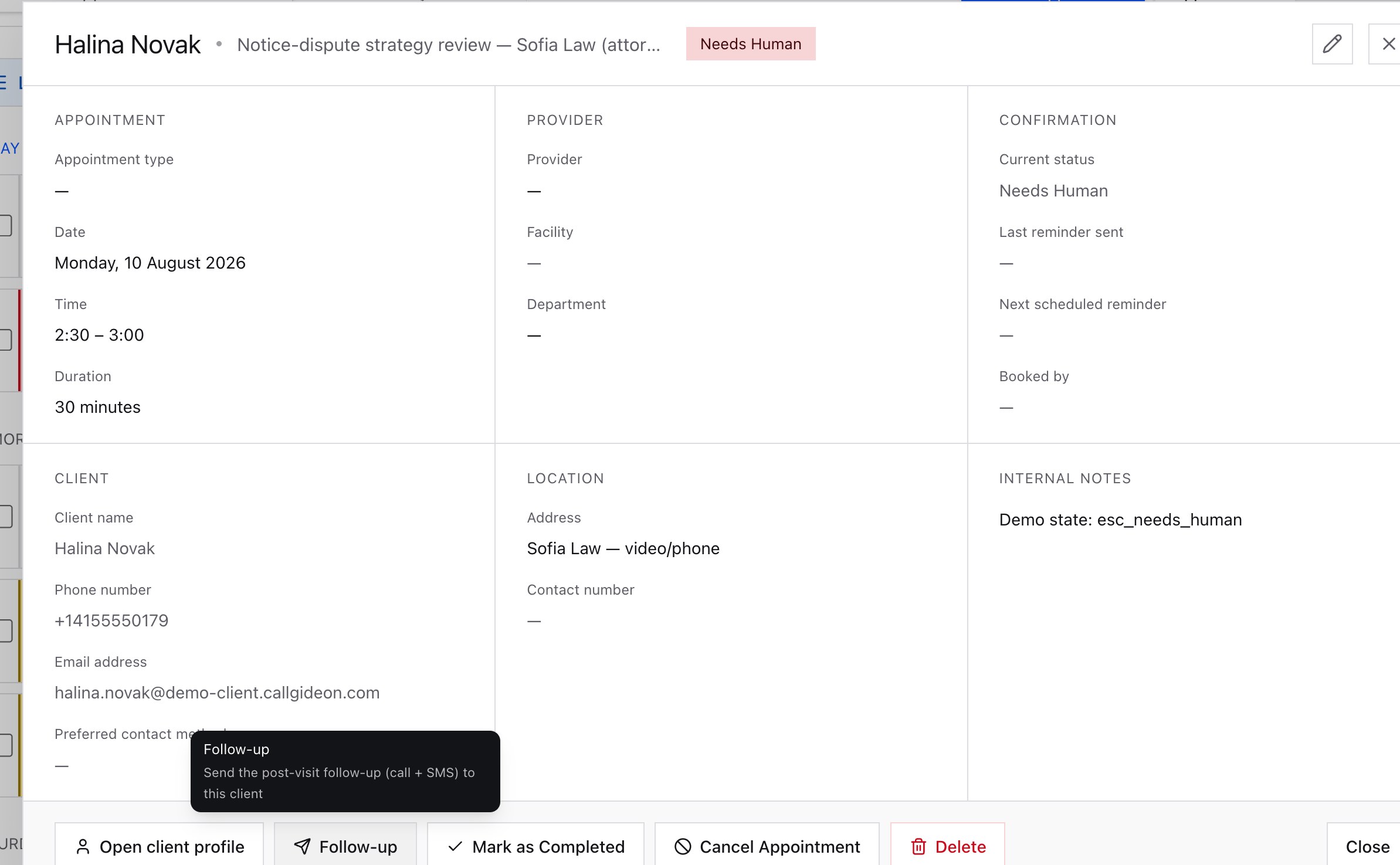
- 1Every field at once, most of them empty, and nothing that says where the data came from
- 2A status you could read but not change
- 3Reminders listed, with no way to move the visit, add a call, or hear one
- 4Six buttons along the bottom, and two ways to close
What got simpler
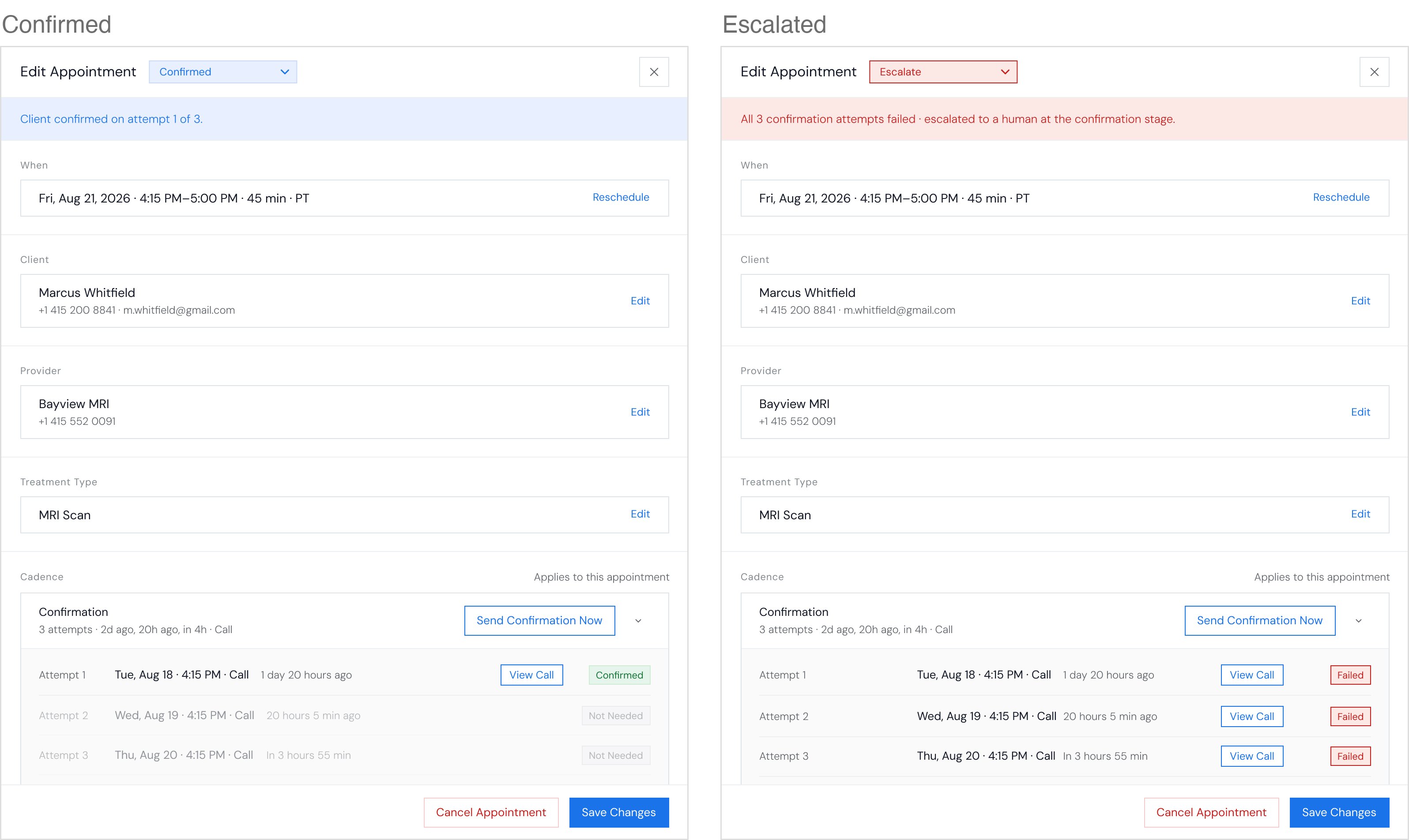
- 1Two buttons at the end: Cancel Appointment and Save Changes
- 2Client, clinic and treatment type in the same order as creating one, each with Edit
What the redesign added
- 3A status you can change, with a banner that says why it got there
- 4Reschedule, beside the time
- 5Send another confirmation call right away
- 6Every attempt with its own status, and View Call for the transcript
Simplifying Case Statuses
Pick what happened, and see which statuses fit, before and after.
- Getting slots
- Awaiting client
- Soft pending
- Callback scheduled
- Confirmed
- Reminded
- Outcome unknown
- Attended
- Attended (incomplete)
- No-show
- Cancelled
- Cancel requested
- Rebooking
- Client unresponsive
- Cannot agree a slot
- Outcome disputed
- Needs human
- Dead contact
- Clinic unresponsive
- Closed
- No cadence
- Unconfirmed
- Ongoing Confirmation
- Confirmed
- Escalated
- Attended
- Outcome Unknown
- No-Show
- Cancelled
Managing Appointments and Tasks
- Ryan calls
- Ryan signs
- Visit booked
- Calls confirmedThis problem
- Lawyer checks
During Ryan’s treatment, Gideon’s calls to him wait for Daniela’s approval, next to her other cases.
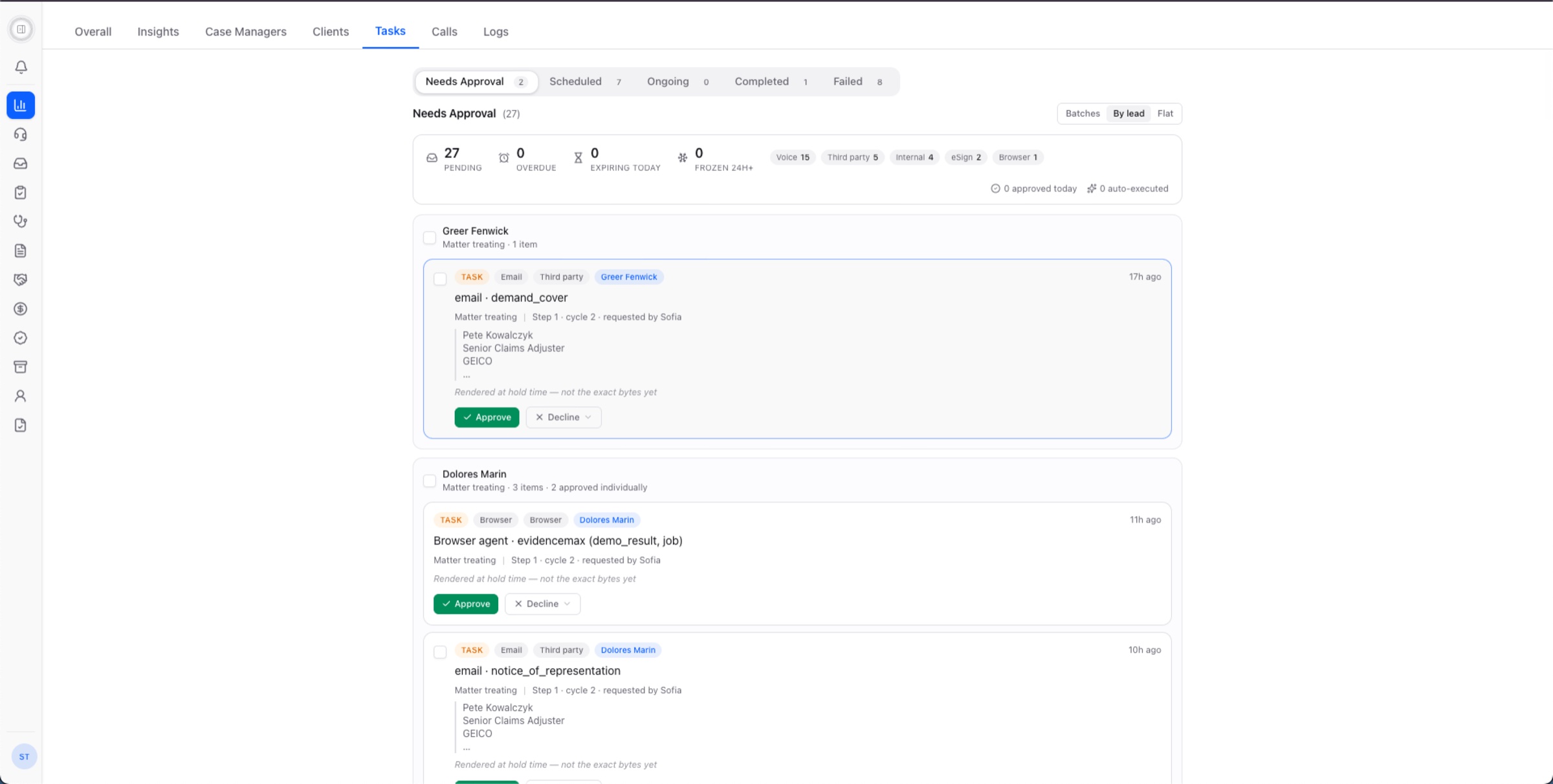
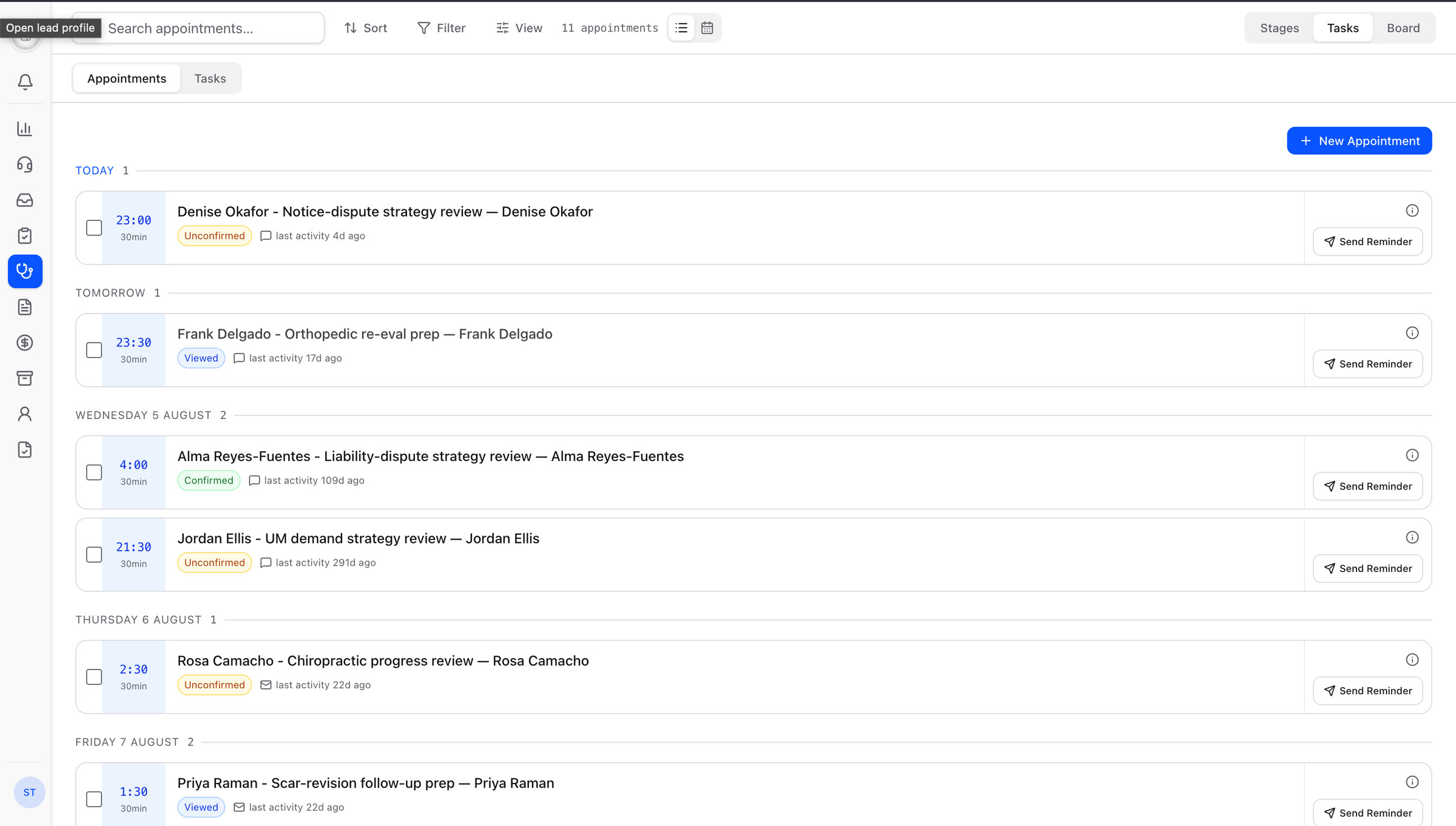
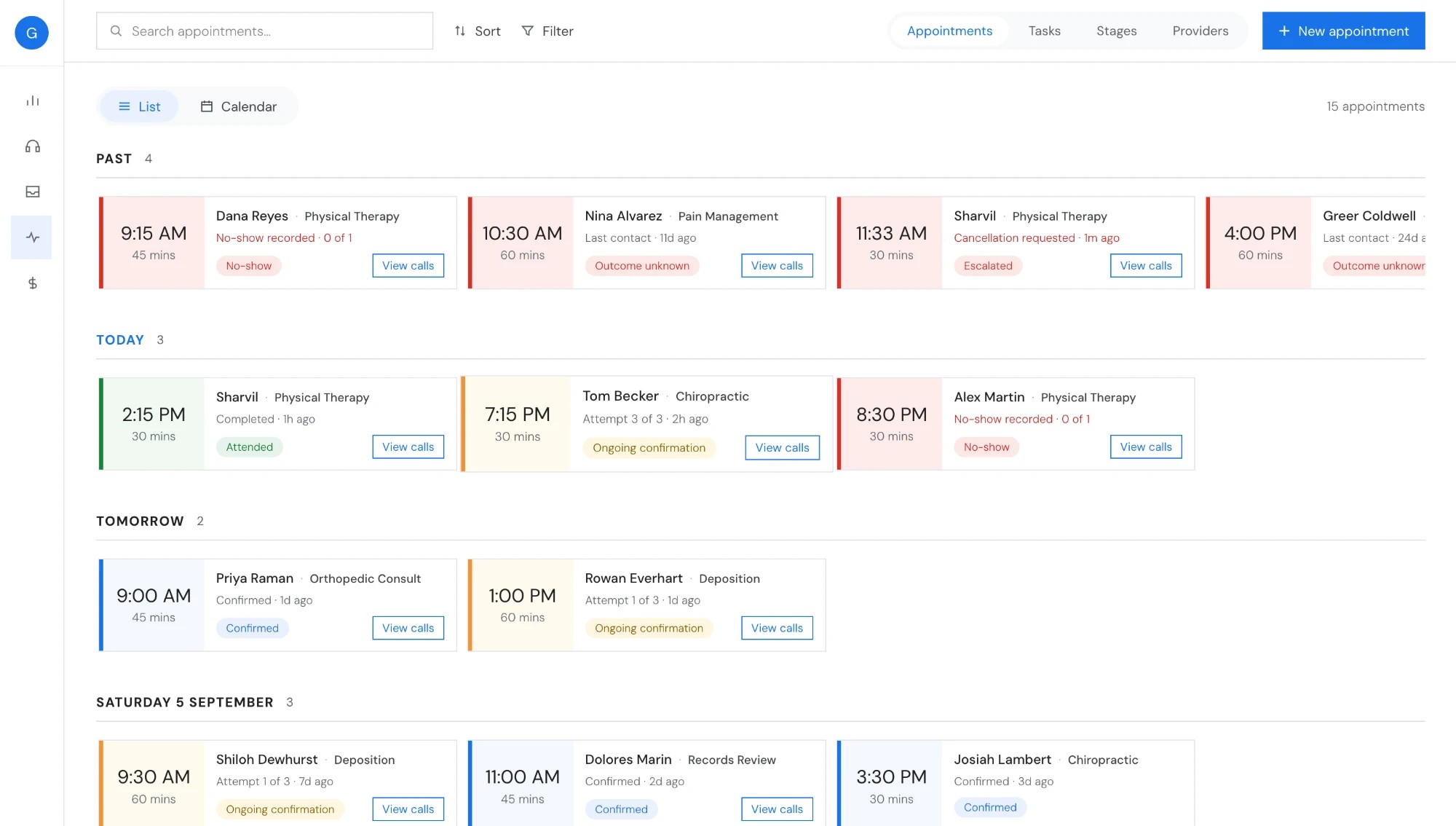
Neither list said where its work stood or what to do next, and Appointments sat under Tasks even though coordinators open them first and most often. I gave Appointments a tab of its own in Treatment, and made every item in both lists show its state with the next action beside it.
Tasks
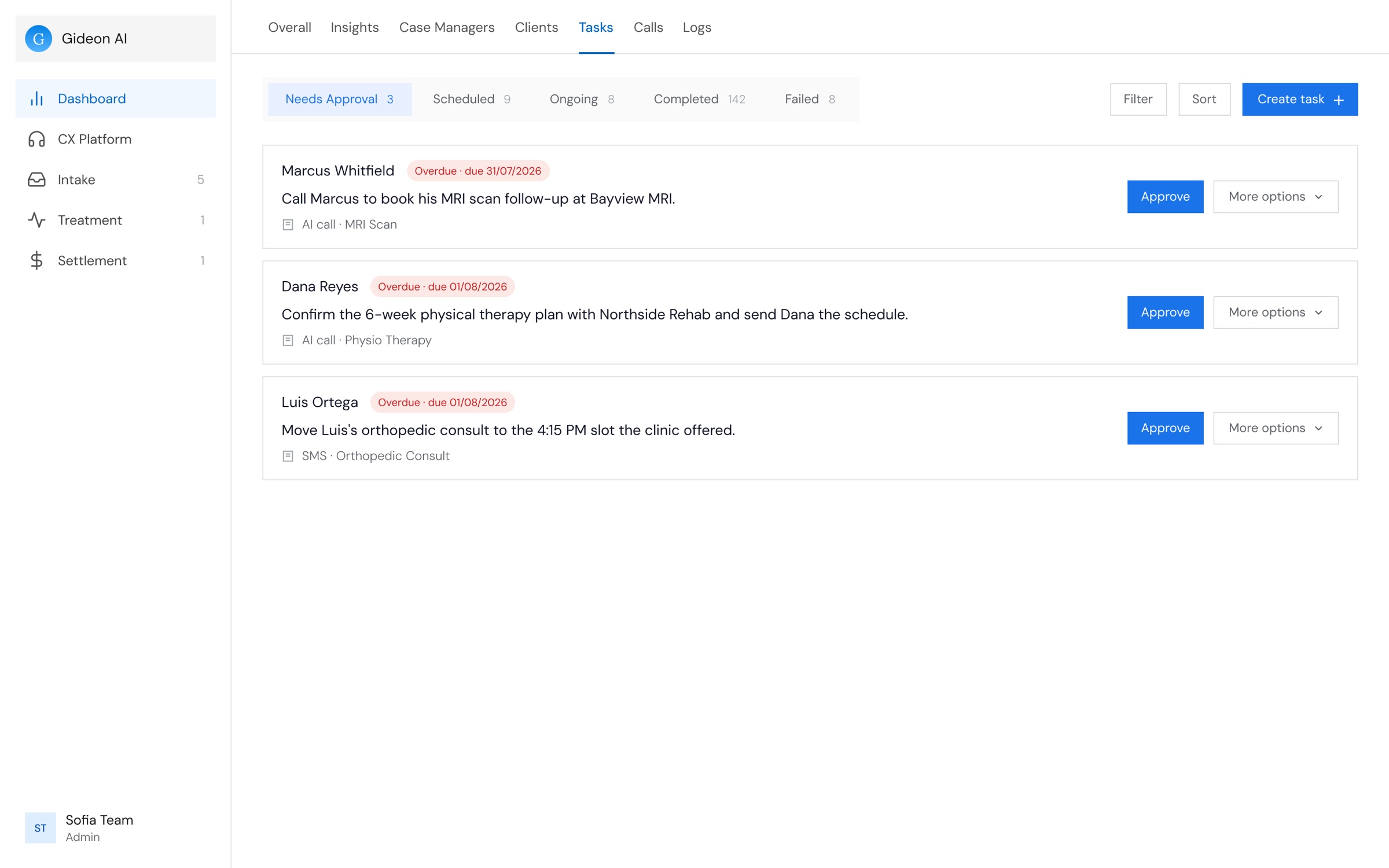
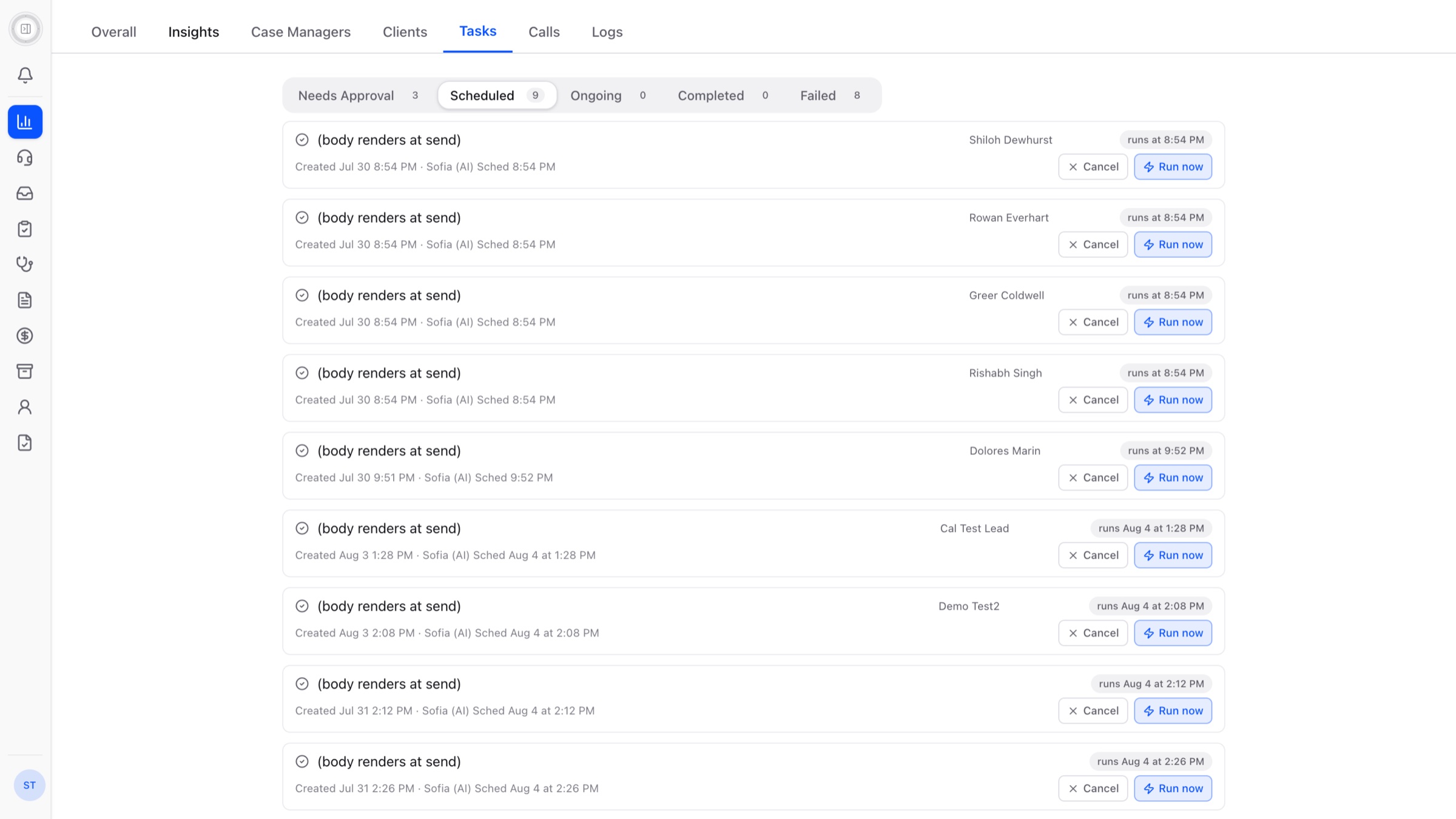
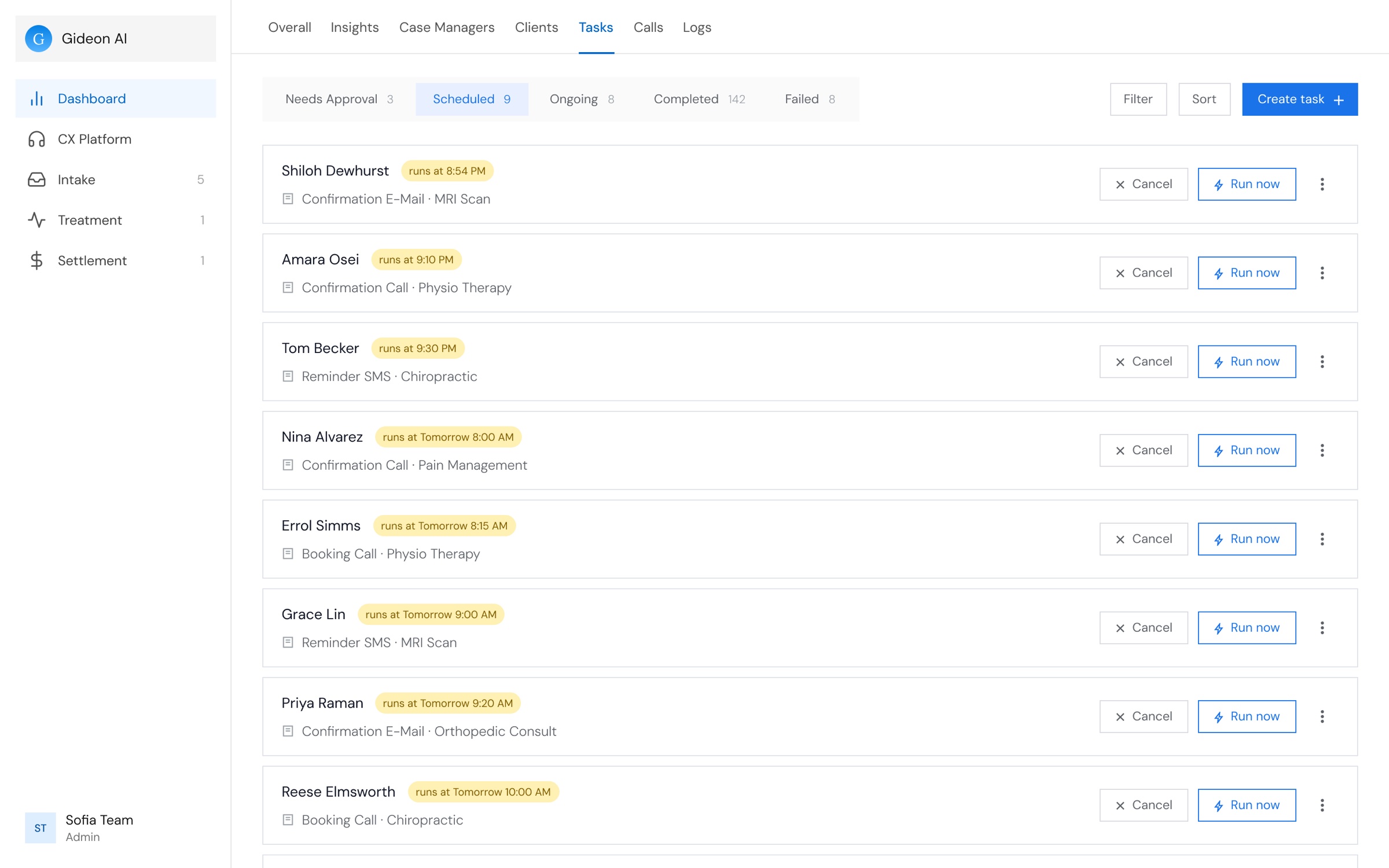
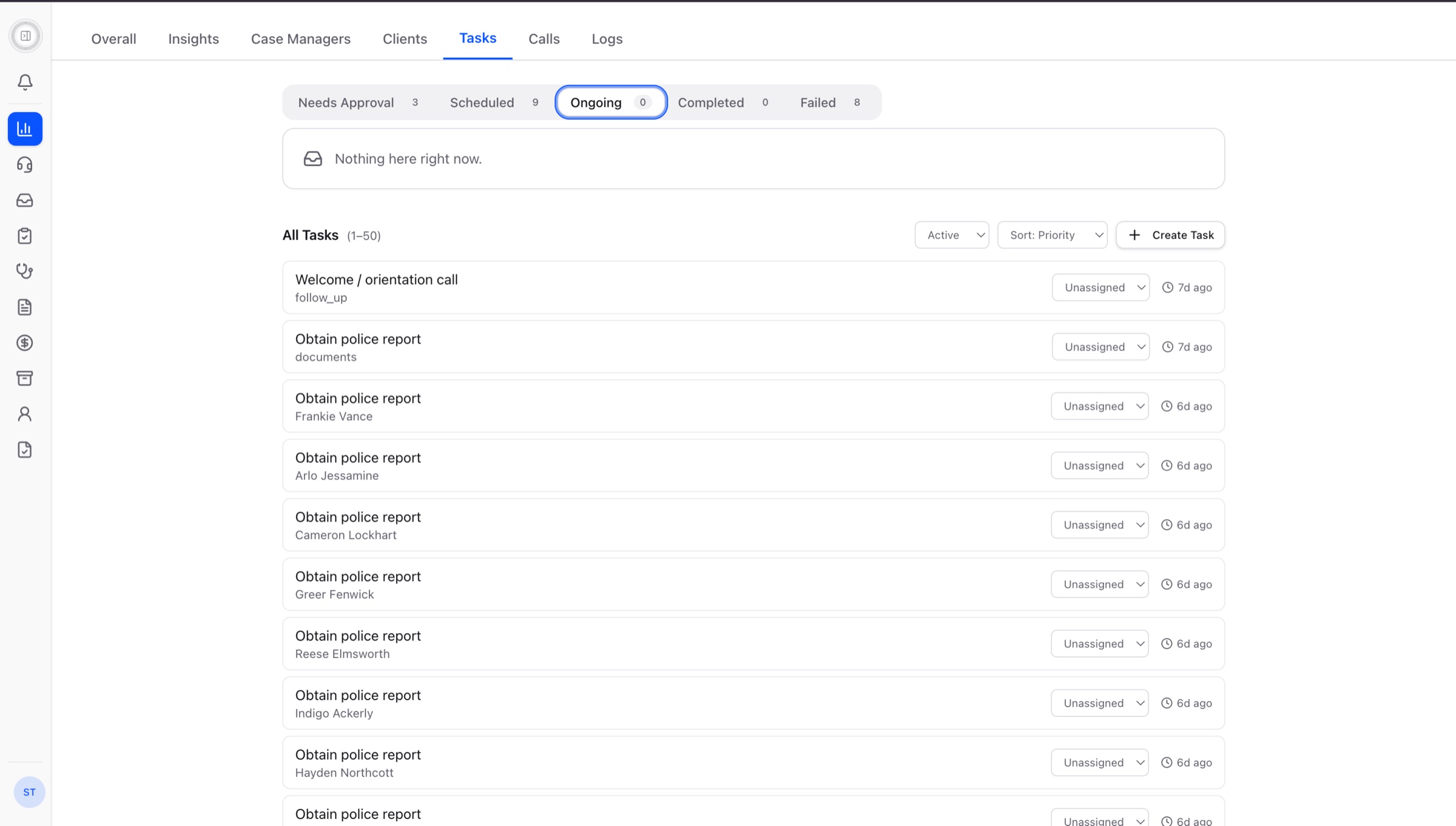
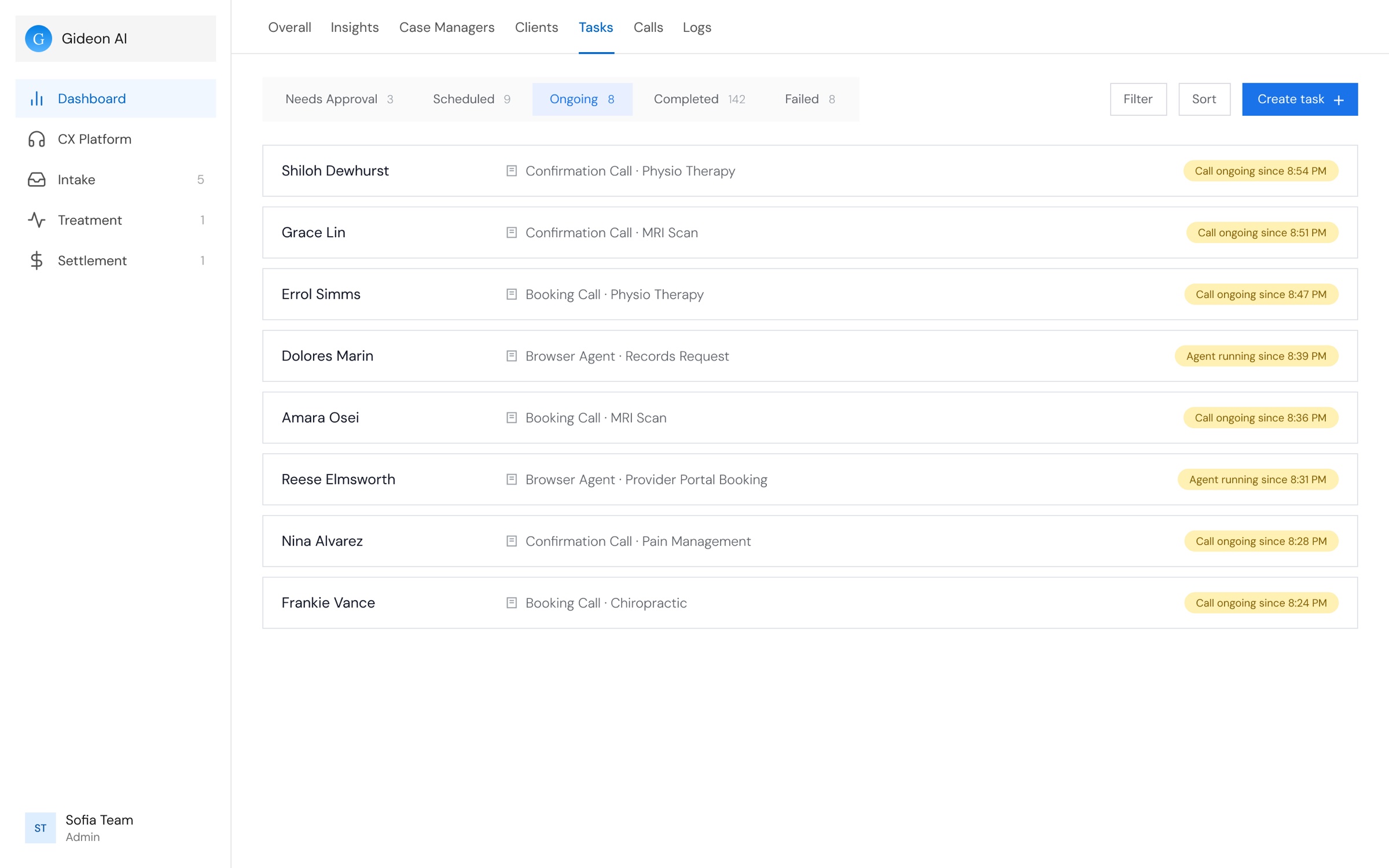
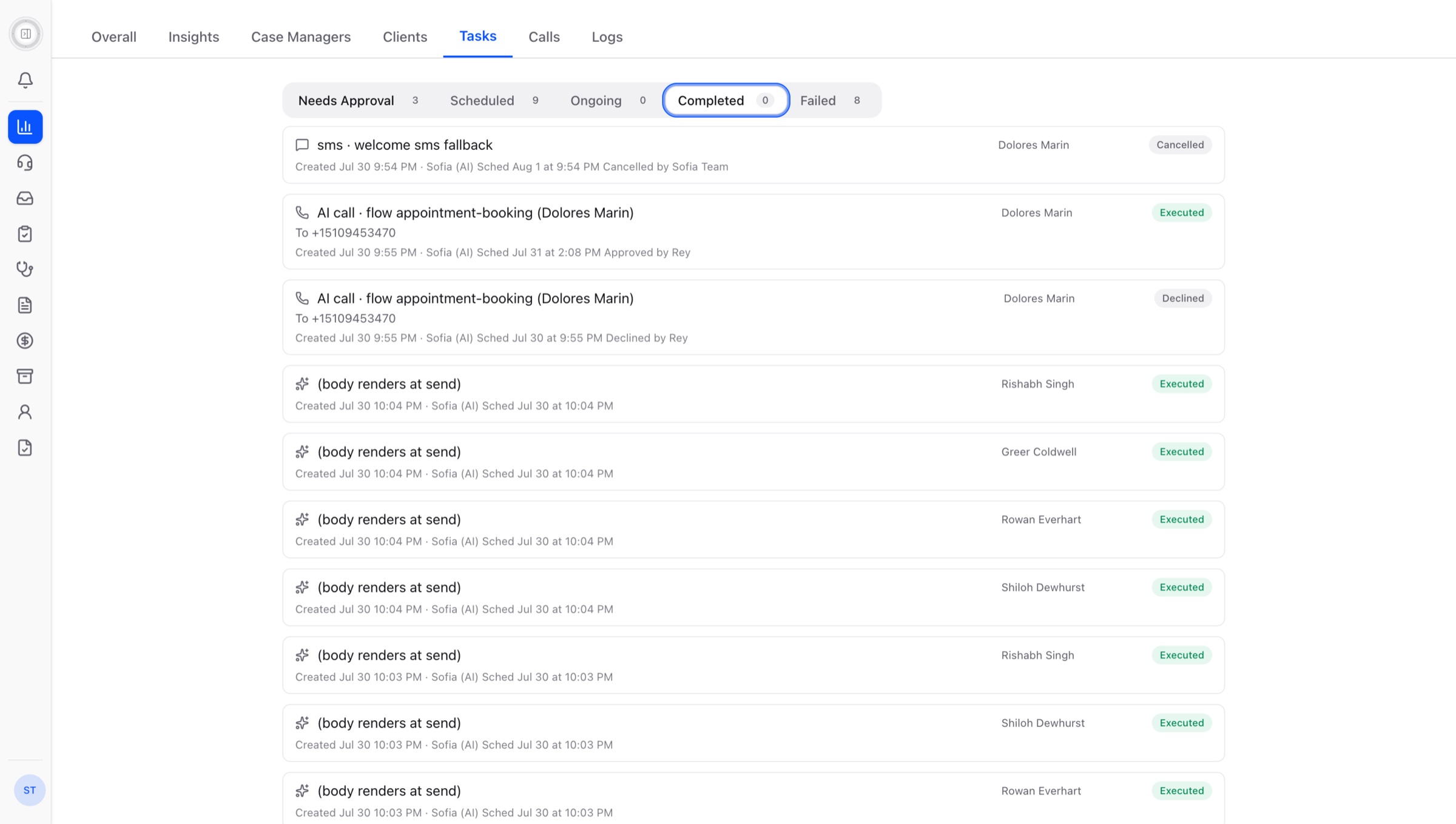
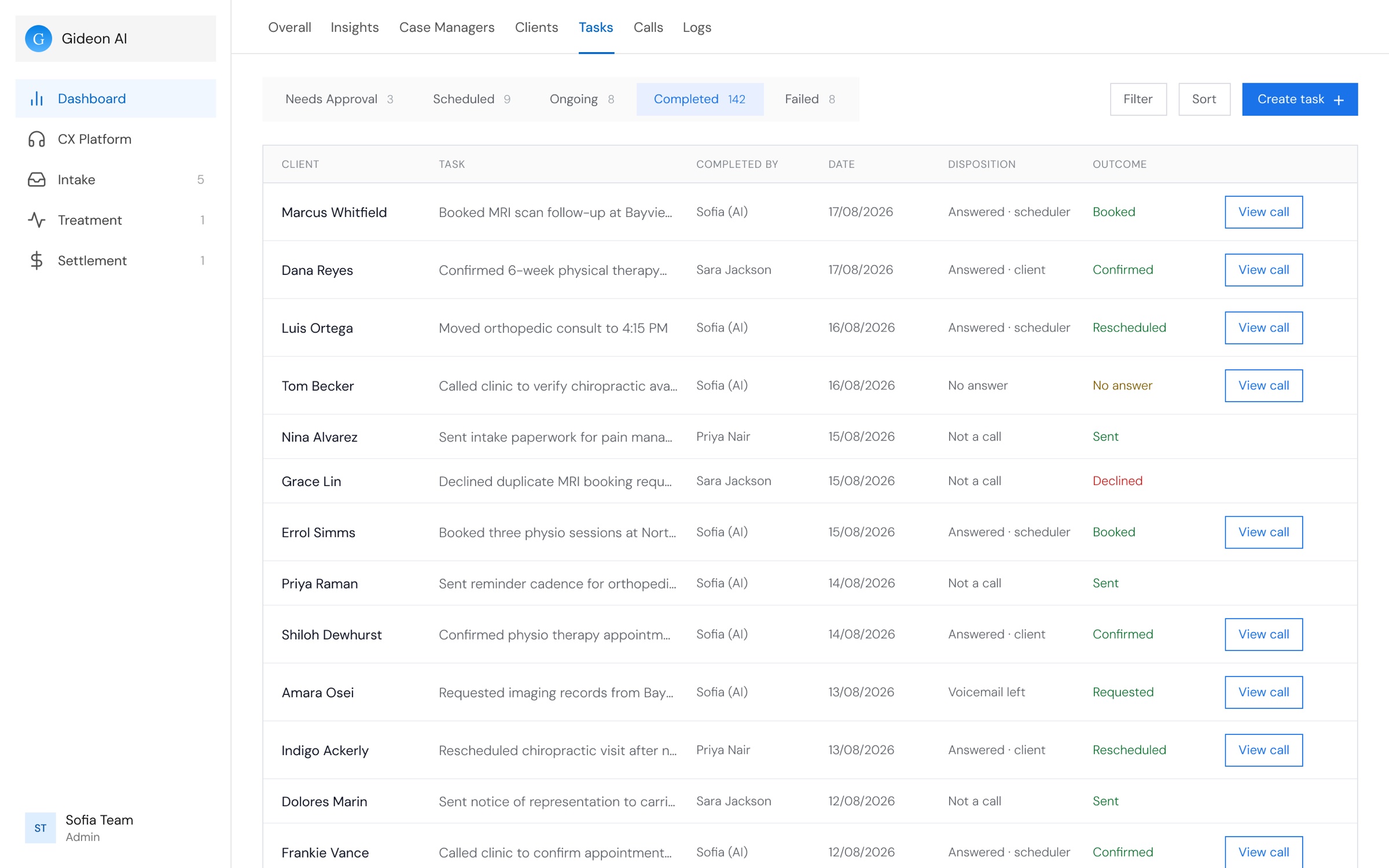
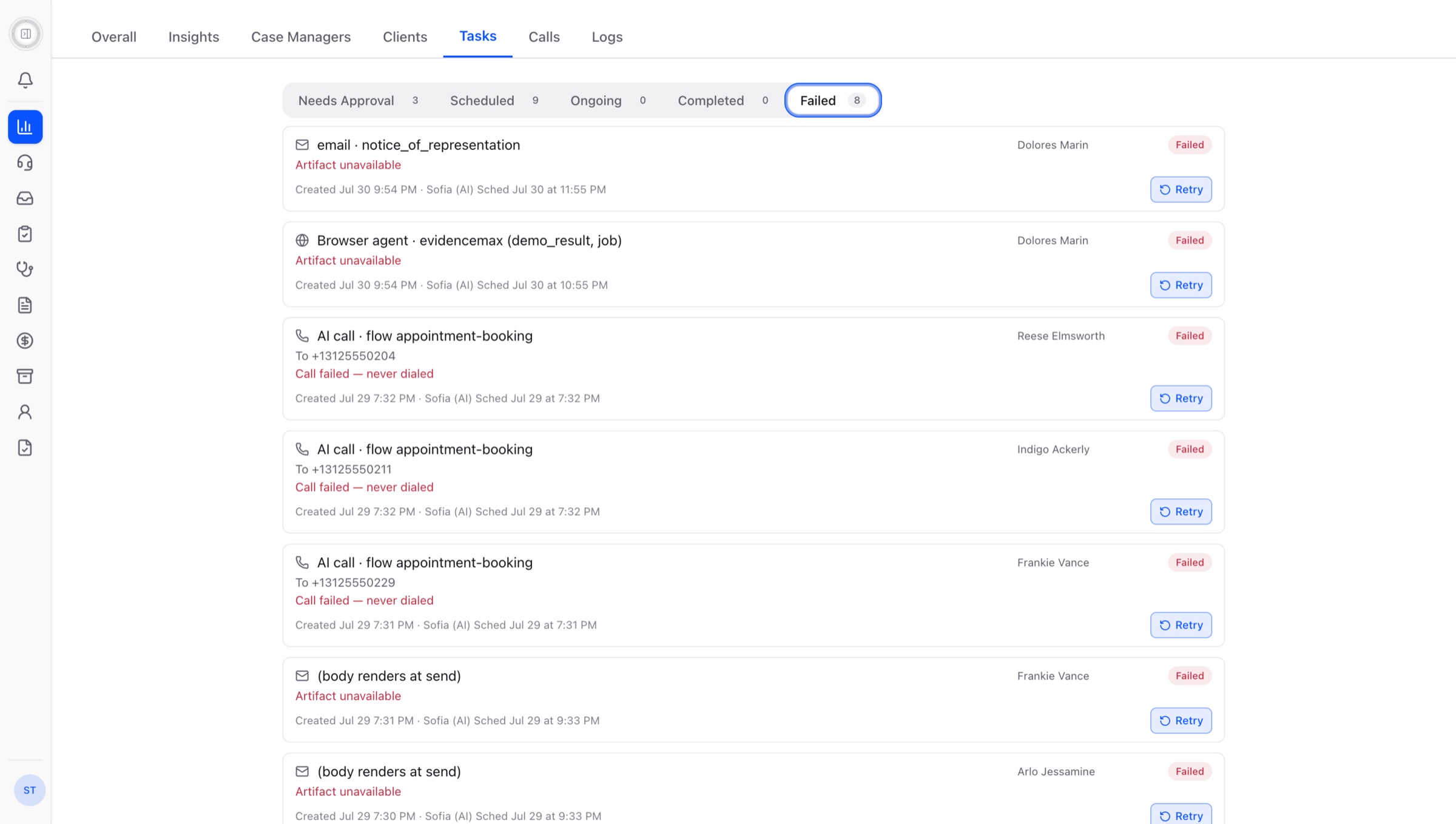
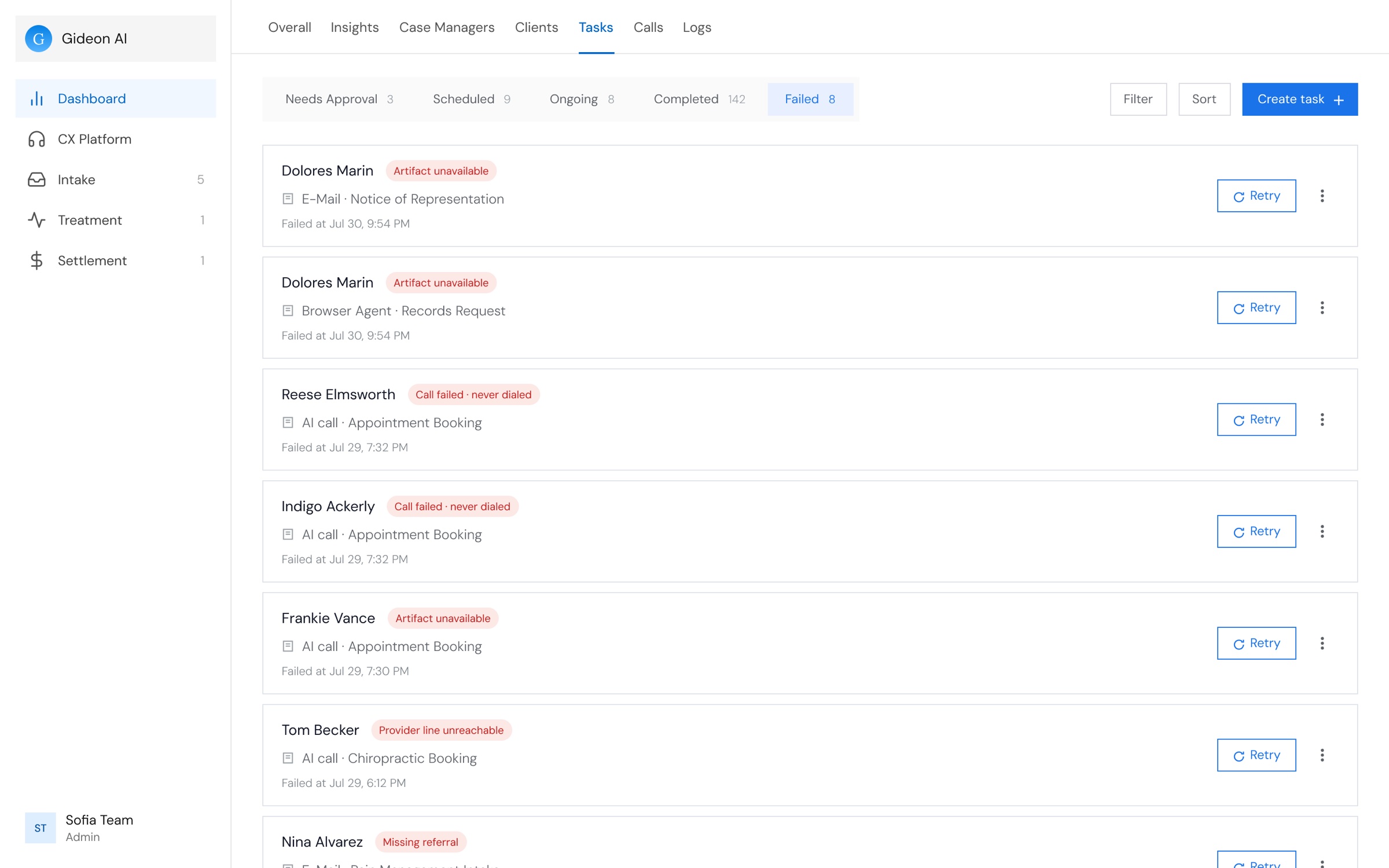
The tabs stayed as they are, because that is what the pipeline has. What I changed is what each one is for: a coordinator is only ever deciding something, watching something run, or reviewing what happened, and each tab now takes the shape its job needs.
All 5 Tabs
-
Needs ApprovalDecide
-
ScheduledWatch
-
OngoingWatch
-
CompletedReview
-
FailedReview
-
What Structurally Changed
- Every tab became one flat list. A task used to sit in a card, inside a client group, inside the tab.
- The client leads every card, so the list is scanned by name instead of by code.
- The next action sits on the card it belongs to, and everything rarer moved behind More options.
- Completed stopped being a list and became a table, because nobody acts on it, they read down it.
Appointments
 1
2
3
4
5
1
2
3
4
5
 1
2
3
4
5
1
2
3
4
5
 1
2
3
1
2
3
 1
2
3
4
1
2
3
4
 1
2
1
2
- 1Every title names the client twice, before and after the visit
- 2Send Reminder on every row, even ones already confirmed
- 3‘Last activity 291d ago’ is the only sign of what happened
- 4A small info icon is the only way to open an appointment
- 5One appointment per full-width row, so few fit on a screen
- 1Compact cards, with no wasted white space
- 2Status and urgency show at a glance on every card
- 3View calls on every card, so the next action is one click away
- 4A card scales up on hover to show it opens, so there is no View Details button
- 54 appointments per row, so every day shows more at once
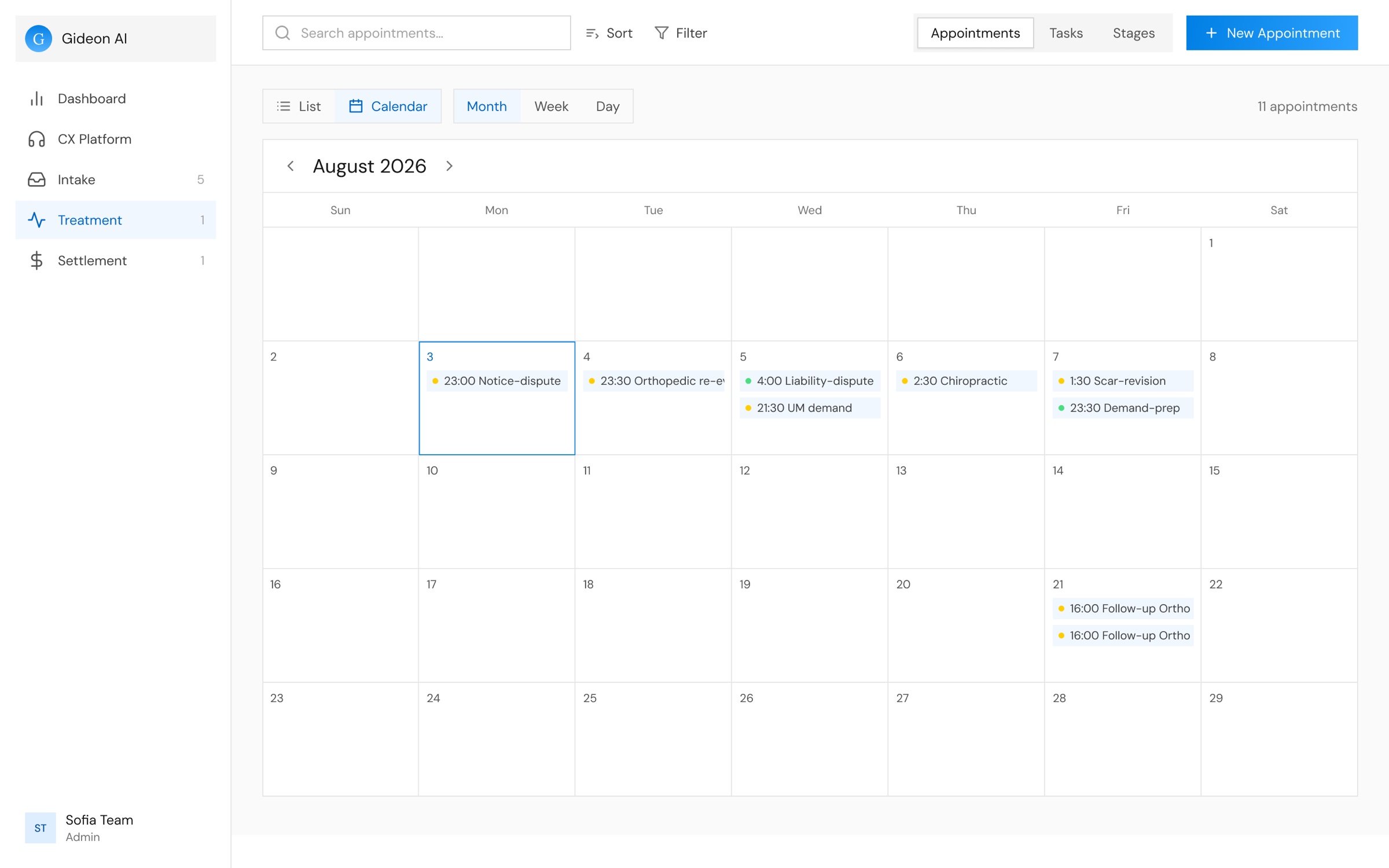
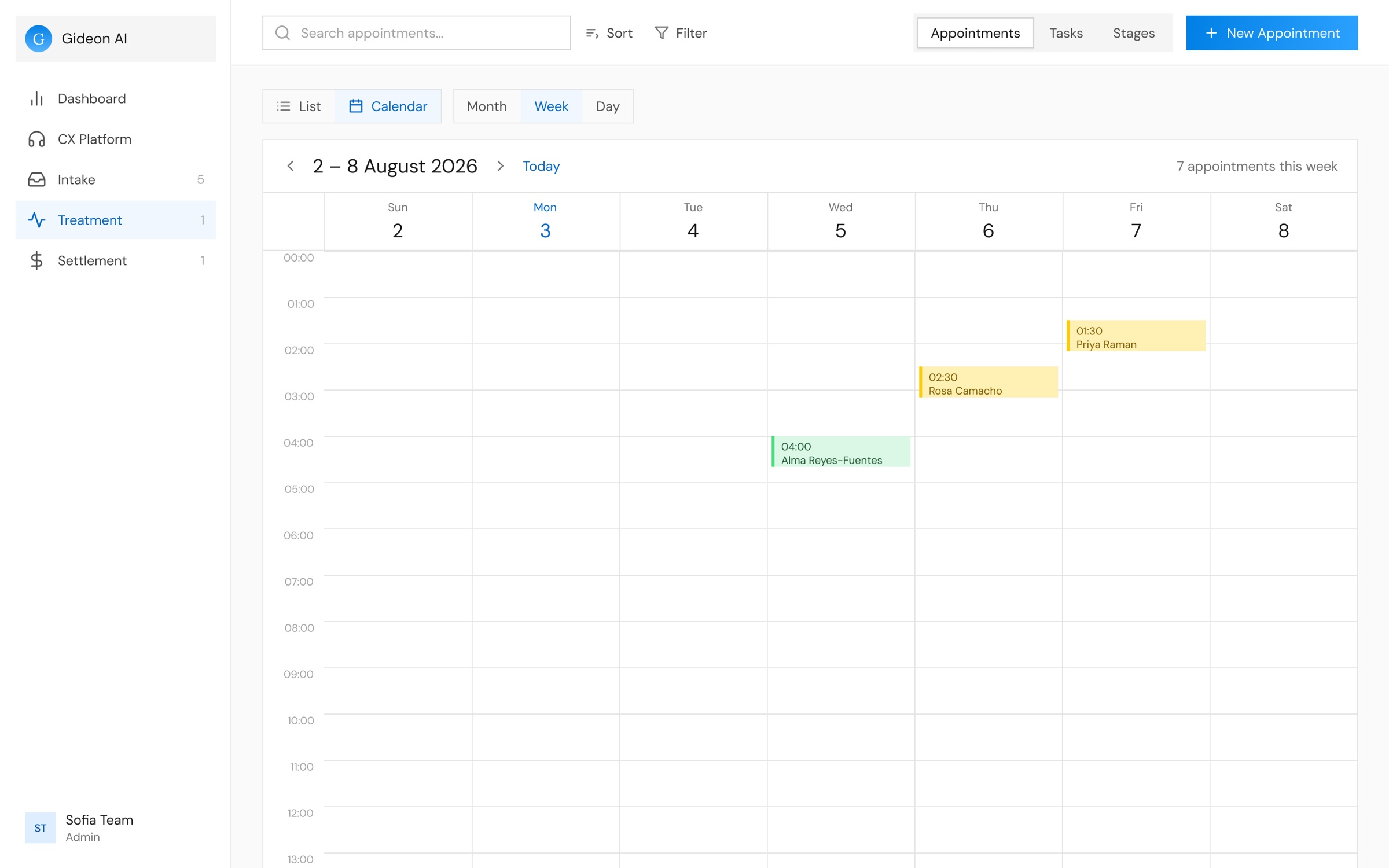
- 1Month, Week and Day, beside List and Calendar
- 2Each appointment with its time, its visit and a dot for its status
- 3Today is outlined, and clicking a date books an appointment on it
- 1Appointments placed at their time, coloured by status
- 2Step a week at a time, or jump back to today
- 3How many appointments the week holds
- 4Clicking an empty slot books an appointment at that time
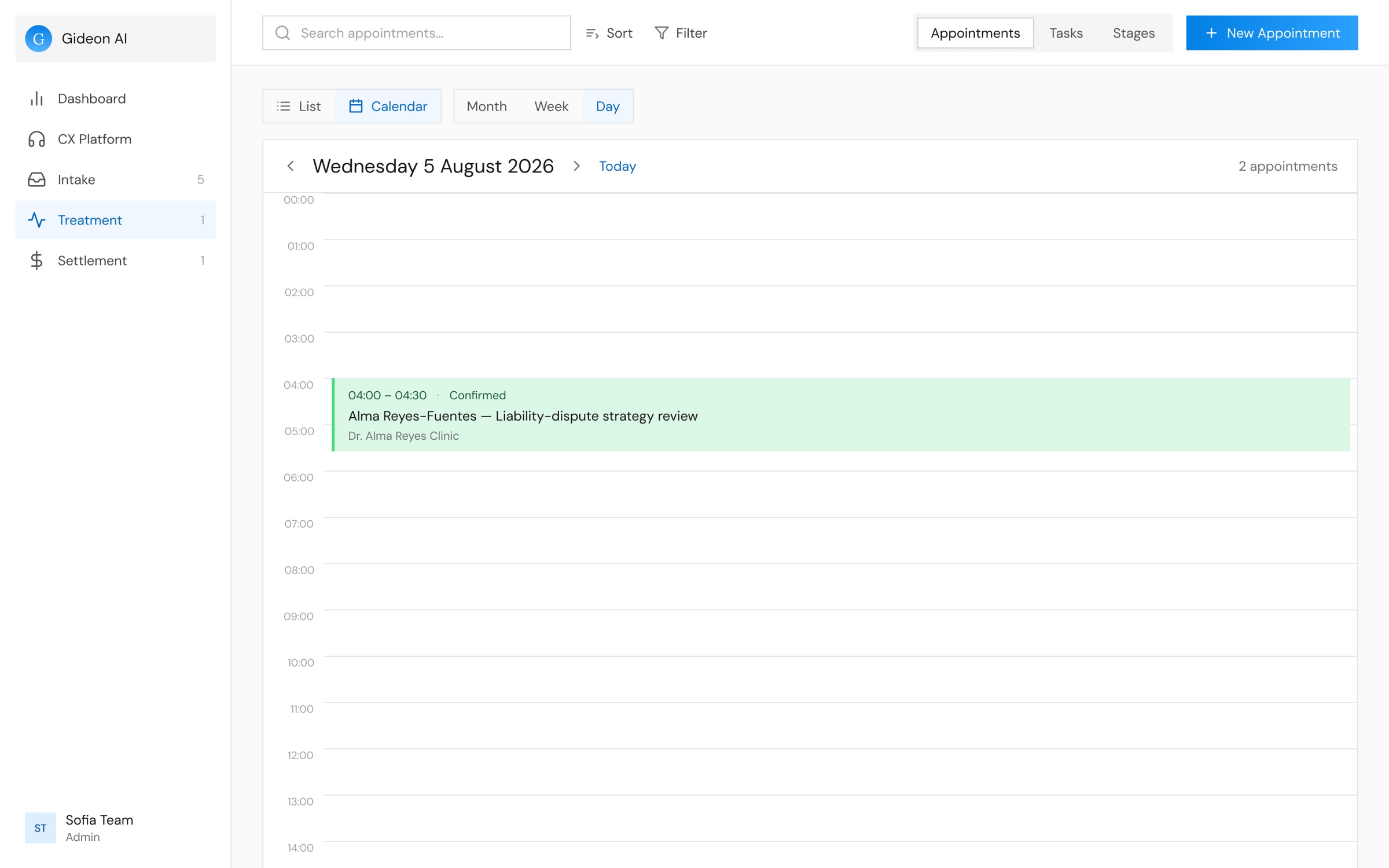
- 1The whole visit in one block: time, status, client, visit and clinic
- 2Step a day at a time, or jump back to today
Simplifying the Client Profile
- Ryan calls
- Ryan signs
- Visit booked
- Calls confirmed
- Lawyer checksThis problem
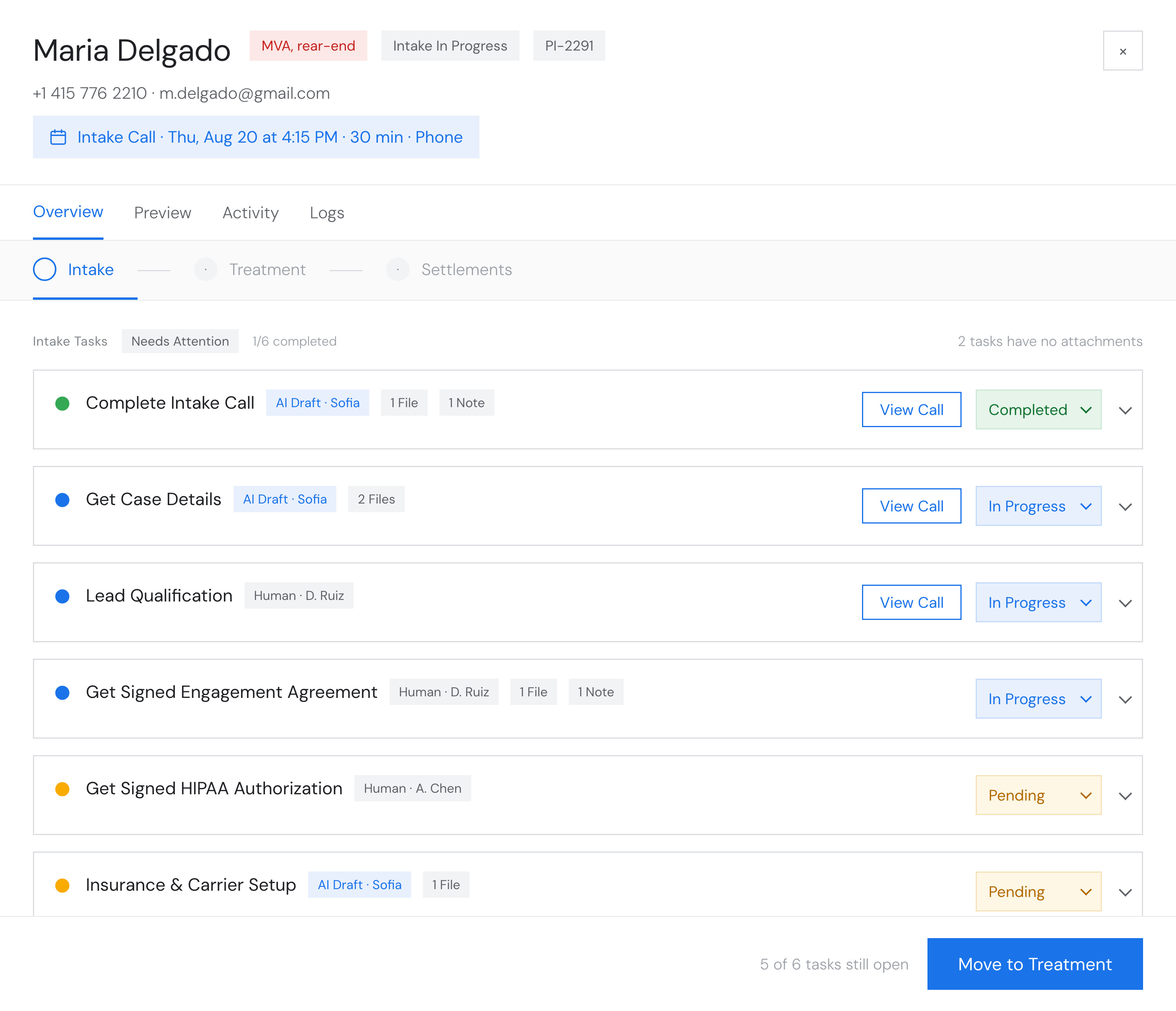
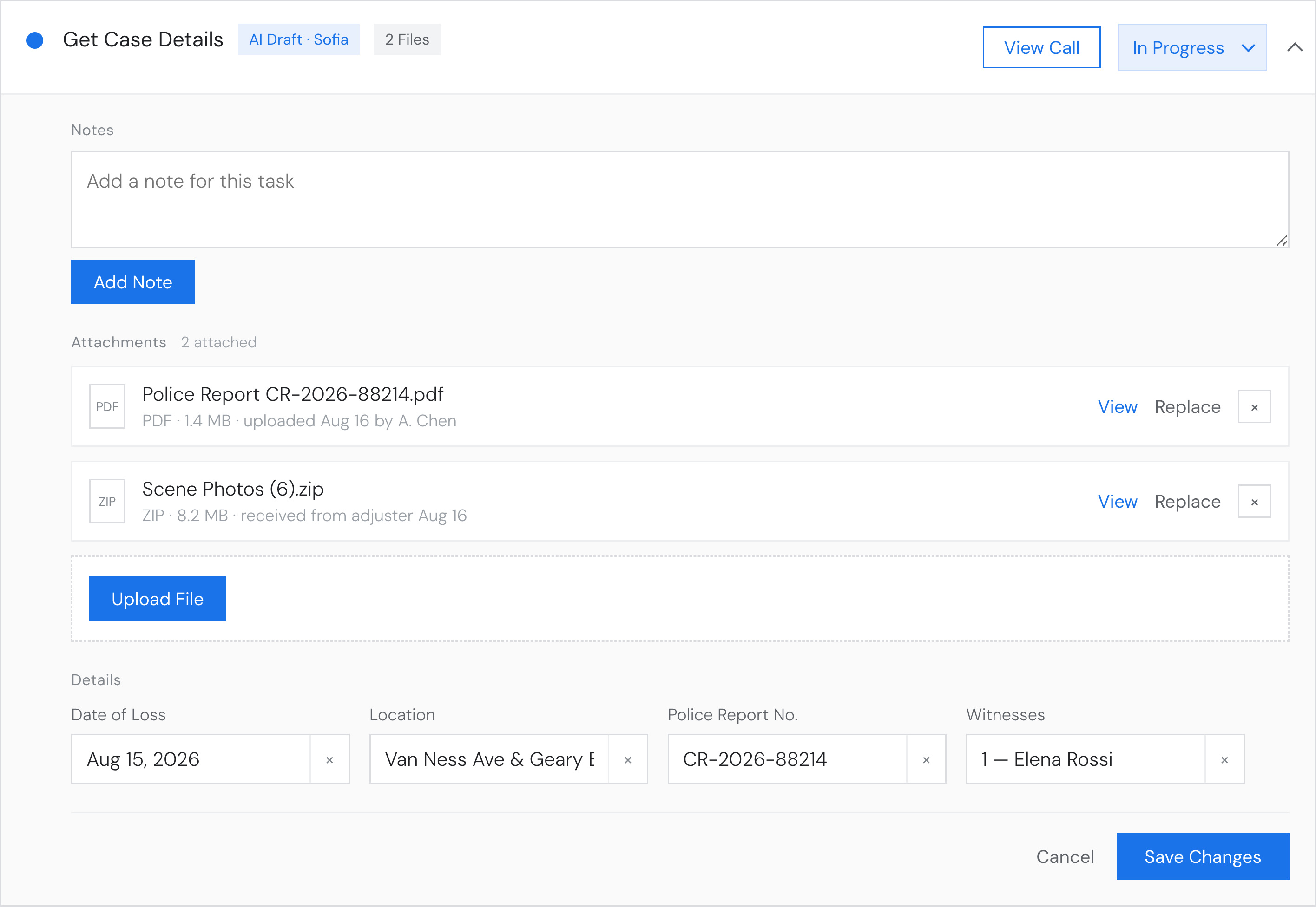
The Client Profile is where coordinators spend their day: every list, appointment and call opens into it, and it holds everything the firm knows about a client. Getting one case from the first call to a cheque ran through six of these screens, and each one carried sections nobody opened. I audited the lot and rebuilt it as three stages.
Before
Every screen a case passed through, at the size it opened.
After
The same case, in three stages.
- Simplified the sections to only the important ones.
- Overlapping stages were generalized.
- A status on every task.
- Call transcripts give each task its context.
- Note and file counts on the task.
- Complete a stage and move on in one step.
- Global components, so one flow is learned once.
7.Design System
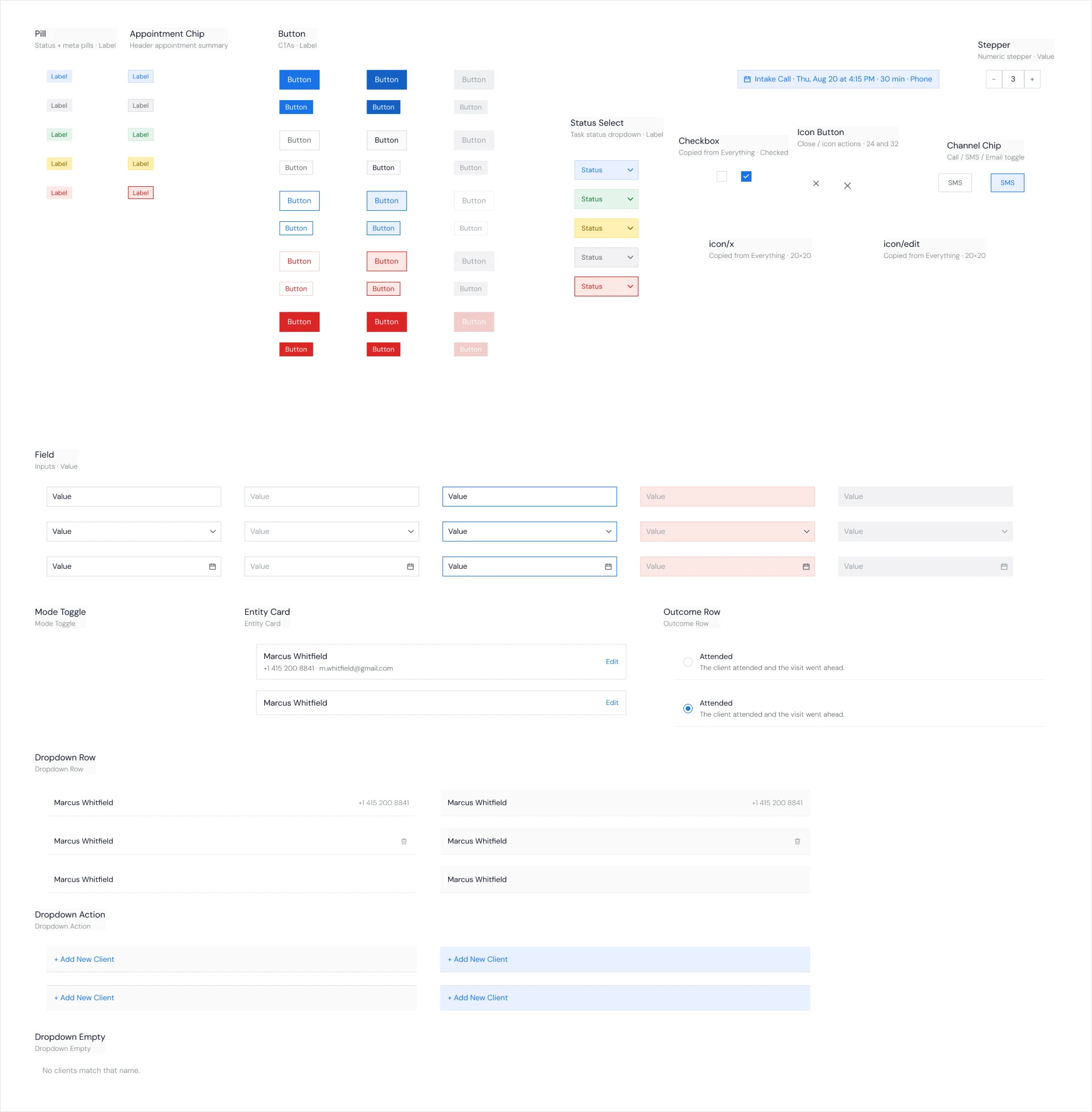
The app couldn’t pause for a rebuild, so I moved each screen onto the tokens as I redesigned it.
Before5 kits, styled by hand
AfterOne set of tokens and components
·
8.Reflection
What I Learned
and Built
I had two months on a product that already worked and was hard to read. This is what I changed, and what it taught me.
-
Design Foundations Set
I learned that I could not fix a screen while the thing around it was still wrong, so I redrew the information architecture first and every redesign after that came faster.
-
Design System Built
I built the tokens and components before I needed them, and by the third screen I was assembling parts I already trusted instead of drawing the same button again.
-
Building in Code
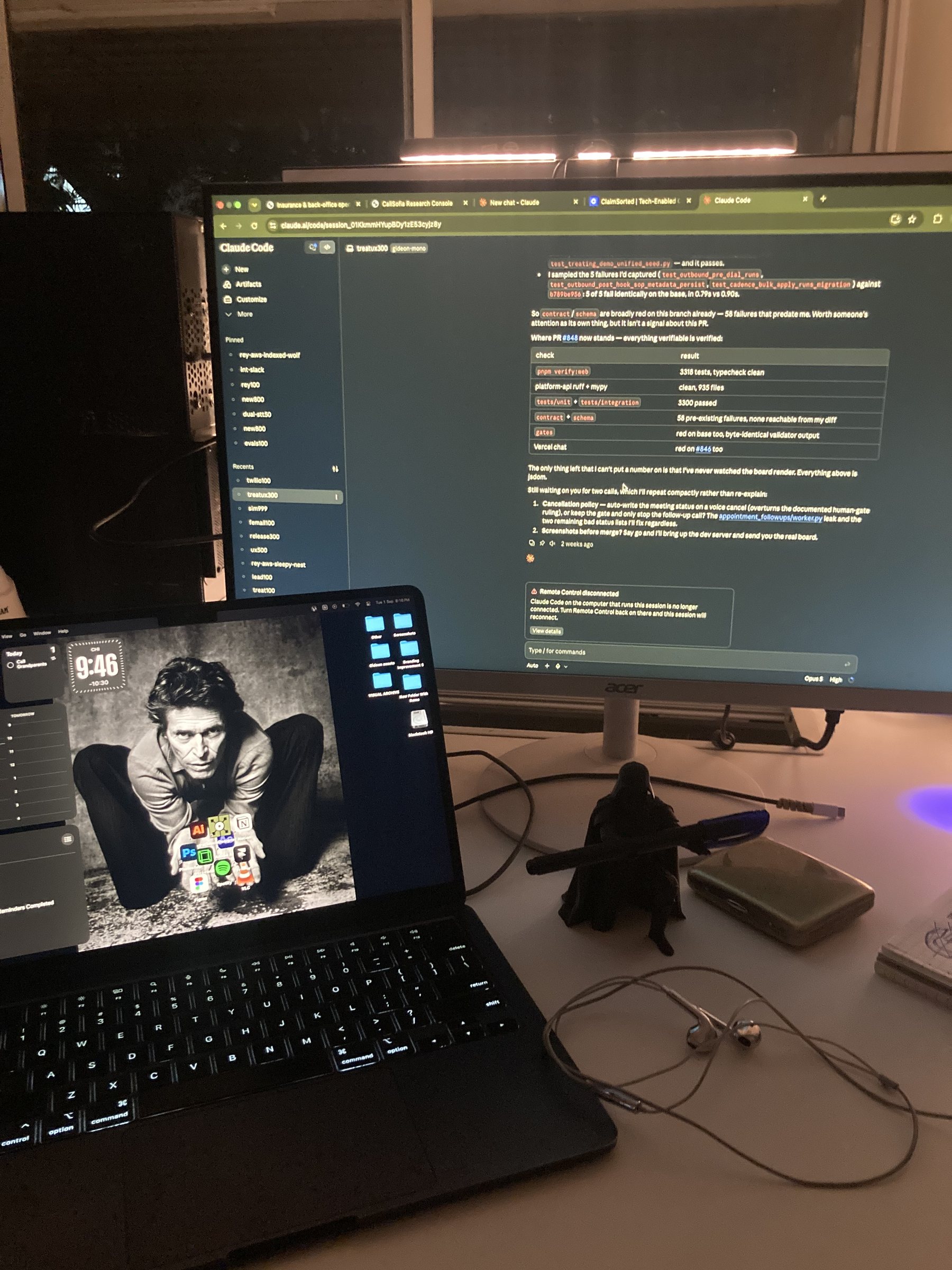
I learned to build my own screens in code with Claude Code and merge them into the app myself, so nothing got lost in the gap between a Figma file and the product.
Thank you for reading.
 Framer
 Illustrator
 After Effects